QR ordering for takeaways, snack bars and kebab shops
Your guest orders.
You are already cooking.
One card, wherever you put it. The guest scans, picks calmly from your whole menu and sends. The ticket is on your screen within two seconds — complete, legible and without "what was it again?".
Have a look first
This is how an order runs through
Scan, order, cook, ready, hand over. Every screen in this clip comes from the real system — nothing has been mocked up.
Now you
Try it yourself — this is the real thing
Tap something on the left and send it. On the right you see what happens on your screen in the kitchen. Nothing here is a mock-up.
Try it — tap something
Your order is in
The kitchen is on it.
Your order is ready!
Collect it at the counter.
Your screen in the kitchen
Pick something from the menu and send.
↑ This is not a picture. This is exactly what your guest sees on their phone, and exactly what your screen shows in the kitchen.
Already live
These businesses went before you
From scan to bag over the counter
Six steps, and not a scrap of paper involved
Everything you see below is a screen from the running system.
1 Step
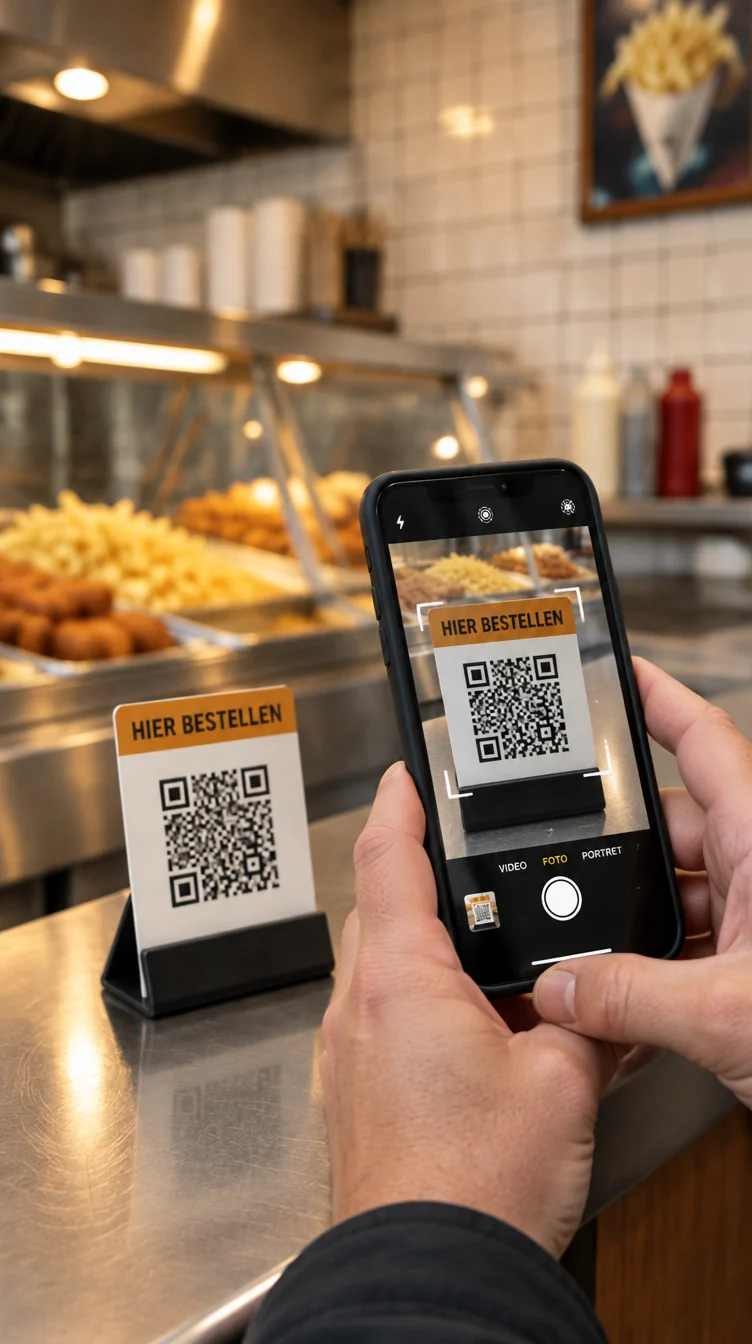
The guest scans the card
You decide where the card goes: by the door, on the counter, on every table, or all three. It says ORDER HERE with a QR code. Scanned with the normal camera — no app, no account, no login. Anyone who would rather order at the counter simply does; the card is an extra ordering point, not an obligation.
2 Step
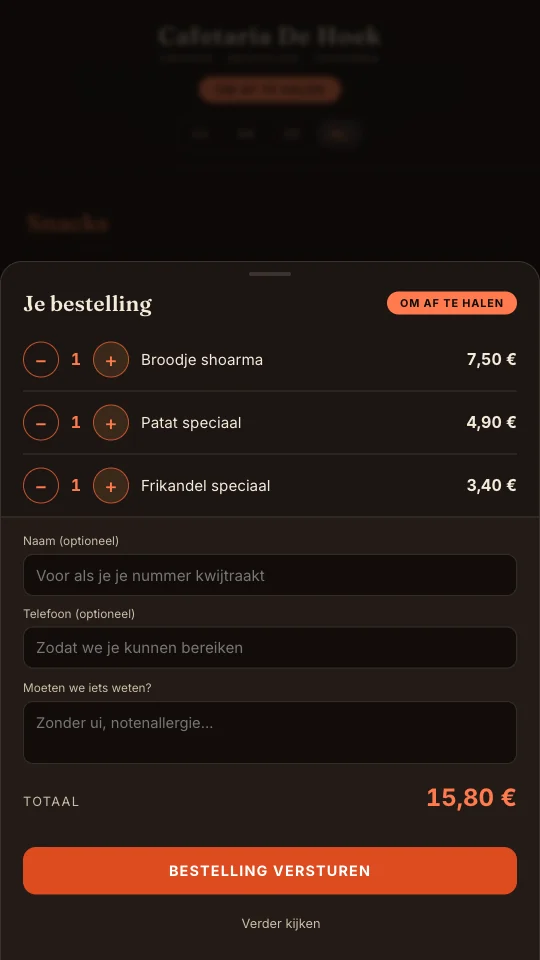
They choose calmly and send
Your whole menu is in there, with descriptions and prices. They tap the plus signs, watch the total run along and send. No queue sighing behind them, so they actually look at the rest of the menu.
3 Step
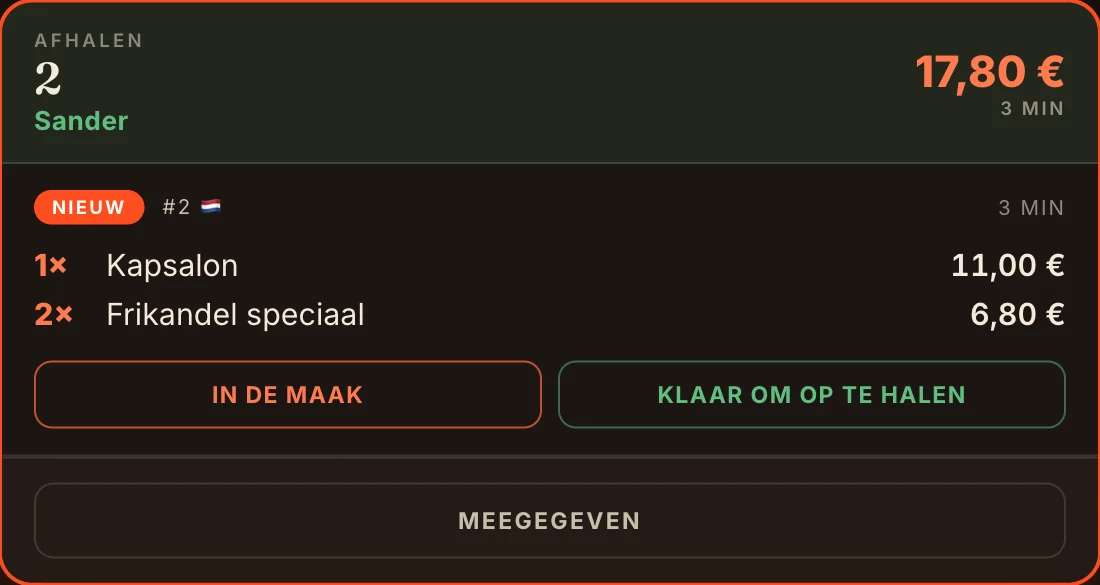
The ticket is on your screen
Within two seconds, with a chime. No scribble, no mishearing, no "no onions" that never got passed on. And when it is busy you see at a glance what is outstanding and what the day has done so far.
4 Step
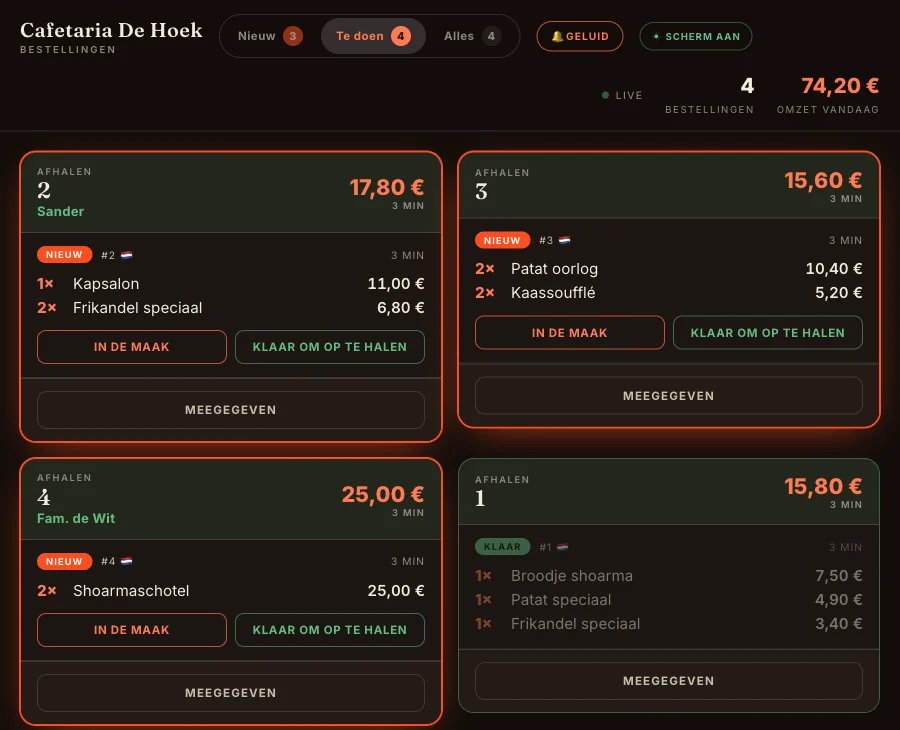
One tap: ready
You make it, you tap Ready for pickup. That is the whole action. The screen hangs on the wall or lies on the counter — an old tablet or a phone is enough.
5 Step
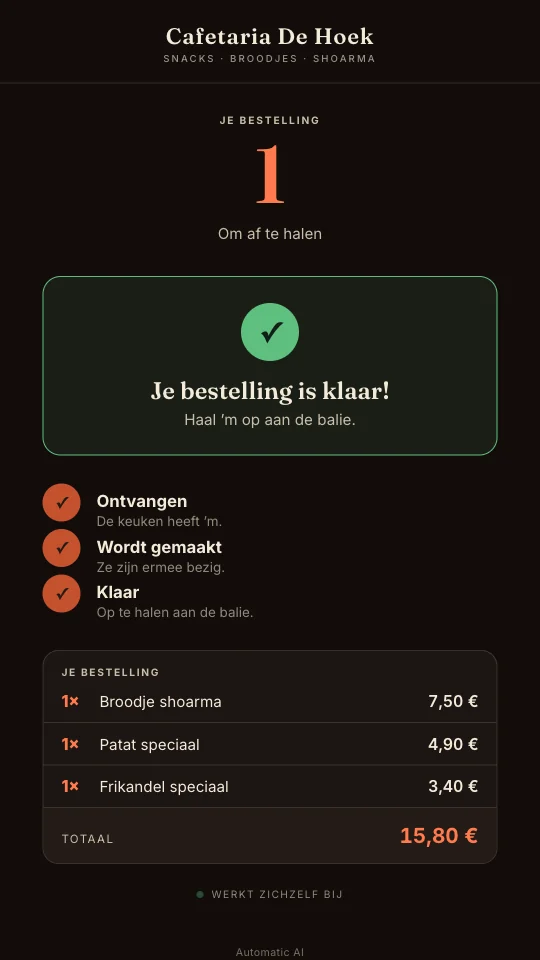
The guest sees it on their own phone
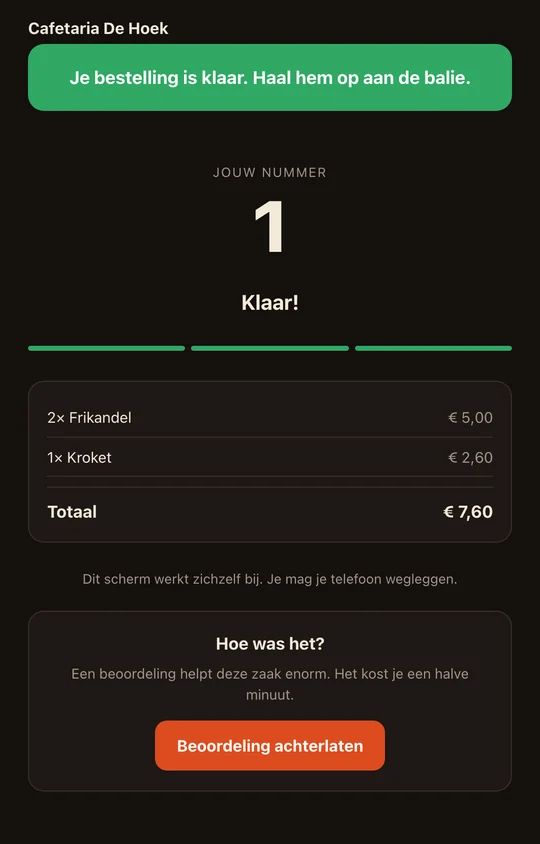
The screen he keeps open after ordering turns green by itself: your order is ready. No text message, no app, no cost per message. If you want everyone to be able to see it, hang a screen above the counter yourself — an old monitor or a tablet will do. You do not have to; it works without one.
6 Step
And then the screen asks for a review
On that same screen, below the receipt, it says How was it?, with a button that opens your Google profile’s review box directly. At exactly the moment he is standing there, happy, with his order in his hand — not three days later by email, when he has long forgotten he was ever with you.
You put in your own link, and from then on every guest gets the question. That is exactly where the difference is: most people are happy to leave something, they simply never think of it once they are outside again. More and fresher reviews make your profile stronger — and that improves the chance that new customers will find you sooner in the future.
Two ways, one system
For takeaway and for those who stay
The only difference is the card on the table or on the counter. You look at the same screen.
Takeaway
One card, wherever you want it
The order arrives without a table number, with a queue number. The guest keeps their status screen open and sees when they can collect. They may fill in a name and phone number, but it is not required — the number is the identification.
- The number runs per day, so it stays short and sayable
- Takeaway tickets sit apart on your board, with a green border
- Optionally a screen above the counter with just the numbers
Eating in
One card per table
Every table gets its own QR with the table number in it. Everything that table orders all evening gathers on one card, with a running bill. Ordering more is one tap — nobody has to wave anyone down.
- Every round from one table on one card, one total
- Settling closes the table in one action
- Multilingual: the guest picks their language, you see it in yours
Grows with you
From one card to a hundred tables
You start with what you need. One more table is one more card — no new subscription, no engineer, no new hardware.
Takeaway only. One QR wherever you put it in sight, one screen in the kitchen. Live within a day.
Every table its own card. The board groups automatically per table, with a running bill per party.
At those numbers, filtering matters more than scrolling. The board has New, To do and All with counters — and the revenue in the header always stays the total, so a filter never hides a bill from you.
Takeaway and tables together on one board. Takeaway tickets get their own colour, so you never treat one as a table by mistake.
Honest figures
What it really does — and what it does not
Everywhere you read that self-ordering lifts spend by 30%. That figure comes from a kiosk vendor’s own brochure and cannot be found anywhere at McDonald’s itself. These are the figures that do have a source.
higher ticket when ordering yourself than at the counter. The honest range from the research lies between +7% and +16%.
David Gibbs, CEO Yum! Brands, kwartaalcall 2 aug 2023orders goes wrong today. Over 40% of those is a passed-on change that did not come across properly — exactly what disappears when the guest taps "no onions" themselves.
Intouch Insight, Drive-Thru Study 2026 — 2.145 gemeten bezoekenof takeaway revenue already runs digitally, and that grows twice as fast as the till. The question is not whether, but through whose channel.
NTF-panel, 360 Nederlandse zakenThe sum for an average business
| Annual revenue | € 300.000 |
| Average ticket | € 12 |
| Share going through the QR (conservative) | 30% |
| Ticket increase on that share | +10% |
| Extra revenue | € 9.000 |
| Gross margin, takeaway sector (CBS) | 68,7% |
| Extra gross profit, less the subscription | ≈ € 5.200 |
Put that next to the median net profit of a limited-service business — about
4% of revenue, so some € 12,000 — and you are talking about a sizeable slice of profit on top,
without a single extra customer.
Sources: Statistics Netherlands 81156ned (gross margin 68.7%, SBI 56102, 2024) and NRA State of the Industry 2025.
And what we do not claim
It does not save staff. Wetherspoon,
Dave’s Hot Chicken and research in Technology in Society all point the same
way: the hours do not go down. What you get is capacity — the same people
process more orders, and the hands that now take and key in orders are freed up.
It does not replace the counter. 53% of
over-62s would use such a system, against 81% of younger people. Chains that cut their counter
have taken their kiosks back out. The card is an extra ordering point,
not the only one.
In the subscription
Everything is included
Ordering page for the guest
Your whole menu, with photos or without, descriptions, prices and quantities. Works on any phone, without an app.
Kitchen screen
Tickets within two seconds, with sound. Filters, counters, daily revenue. The screen stays awake by itself.
Status page for the guest
Queue number and three steps. Turns green by itself when you tap ready. Gives a short buzz.
Screen above the counter
Two columns with just numbers — being made and ready. Only if you want one: an old monitor or tablet will do, no hardware is included.
QR cards
Printed and ready, in your own style. For the door and the counter, and numbered per table if you have them.
Multilingual
The guest picks their language, you always see the order in yours. Handy in a tourist town.
Menu changes
Price up, item off, special added — we do it, within a working day.
Asks for reviews
Once the order is ready, your guest gets a button to your Google profile. At the moment they are happy, not three days later.
Setup and a hand on the first shift
We put your whole menu in and walk the first shift with you.
What it costs
One amount a month. No commission.
Delivery platforms take 12% to 14% of every takeaway order. With us you pay a fixed amount, however much you sell.
Takeaway
For the takeaway, kiosk or snack bar without tables.
- Unlimited orders — 0% commission
- Kitchen screen and status page for your guest
- Screen above the counter included
- We update your menu for you
Tables
Takeaway and tables, up to 12 tables.
- Everything in Takeaway
- Numbered cards per table
- One bill per table, ordering more just works
- Choices per dish: size, sauce, extras
Large
Unlimited tables, for the restaurant or the place with a terrace.
- Everything in Tables
- Unlimited tables and cards
- A terrace costs nothing extra
- Priority on menu changes
Or pay nothing at all.
Know other places this would suit? For every business that becomes a customer through your link and pays, 20% comes off your monthly fee. At five you pay nothing at all.
You get your own link as soon as you are a customer, and your own screen shows exactly how far along you are. If one stops, the discount simply drops a step — no refund hassle.
The discount applies to the monthly fee, not the setup fee. You may refer more than five, but free is as good as it gets.
With every plan € 199 one-off: we put your whole menu in, print your QR cards and walk the first shift with you. After that it runs per year, renewing for another year each time and cancellable up to a month before the renewal date. Paying up front is optional for your guest. Many systems force it; we do not, because in a takeaway people simply pay at the counter.
Before you ask
Frequently asked questions
Does my guest have to install an app?
No. They scan with the ordinary camera on their phone and the menu opens in their browser. No app, no account, no password.
Do they have to pay in advance?
Only if you want. It is off by default: they order, you make it, they pay at the counter as always. If you do want payment up front, we connect a payment method. Be aware that you raise a barrier — several of the most widely used competitors make it compulsory, and that is exactly where they lose customers.
What if my internet goes down?
Then it does not work, just like your card terminal. That is why the counter stays open and the card is an extra ordering point, never the only one. In practice the screen runs on 4G from an old phone when the wifi stutters.
Do I need a till or special hardware?
No. Any screen with a browser will do: an old tablet on the wall, a phone next to the fryer, a laptop. A kiosk costs € 1,300 to € 8,000 and is one ordering point that takes up floor space. With us every phone in your place is an ordering point.
Does it connect to my till?
At the moment it runs alongside, not inside. For most takeaways that is fine: the ticket arrives on the screen, you ring it up as you do now. If you have a till it absolutely must go into, let us know — then we will look at whether a link exists.
And older guests who do not want this?
They order at the counter, as always. From research by the American restaurant association: 53% of over-62s would use such a system against 81% of younger people. So you serve both groups — you replace nobody.
Does that review button really bring in more reviews?
Yes — simply because you now ask everyone who ordered from you, at the moment they are standing there happy with their order in hand. Most guests are glad to leave a review, they just never think of it again once they are outside. The more reviews you have, and the fresher they are, the stronger your profile — and the greater the chance that new customers find you sooner in the future. Added bonus: if something does go wrong, you hear about it straight away instead of never.
How fast am I live?
If you supply your menu, within a few working days. We put the menu in, print the cards and walk the first shift with you.
And if I do not like it?
Then you get your money back. A message within thirty days is enough — the whole amount, the € 199 setup fee included, and you do not have to explain why. We take the QR codes away and that is that. We dare to offer it because almost nobody does it once the first orders start coming in.
Am I tied to anything?
You sign up for a year, and after that it runs on a year at a time. You can cancel up to a month before the renewal date, with one message or in your own admin screen. Want out in between, then you pay the remaining months of that year — after all, we have printed your cards and set up your menu. In your first thirty days that does not apply: that is what the money-back guarantee is for.
No obligation
Show me in my place
Tell us what kind of place you have and we will put your own menu into a demo. Then you tap an order through yourself and watch it land on the screen — with your own dishes and your own prices.
Rather have a call? That works too — add your number and say when suits you.